











Products ready to sell.
Orders ready to serve.
Bring your catalogue, stock and orders together for everyday retail.

Serve customers over WhatsApp, run the day, and build the kind of relationship that brings them back.
Neo serves your customers and supports your team, with business data and day-to-day operations in one place.
Purchase history, and offers to match.
Sees it through.From asking about a product to a paid order.
Ready to run the business.Products, stock and scheduling in one flow.
You stay in control.Team access and business results, both easy to keep an eye on.
Neo helps serve your customers and run the daily work. All of it over WhatsApp.
Customers just message. Neo helps them choose, builds the order and gets the payment ready.
See how a purchase runs
Check an order, look at the schedule or update stock from chat. Neo works within each person's access.
See how Neo helps the team
From “is this still available?” to “paid”, Neo helps you serve.
A customer just says what they are after. Neo checks the catalogue, helps them pick a variant, builds the order, then prepares a payment link — so one conversation carries all the way to a paid order.

Ask which offers are available, then use one when you buy.
Customers can just ask which offers they can use. Neo finds the one that fits their profile or order, then applies it to the purchase.
| Offer | Condition | Status |
|---|---|---|
| September member offer | Min. Rp 75.000 | Applied |
| Buy 2 get 1 free | Pastry only | Not eligible |
Choose to pay in instalments, right in the chat.
Customers can understand the deposit, term and instalments available through Neo. If it fits, the conversation moves on in line with the payment policy for that product.
Compare shipping rates, choose an address and send it on.
Customers can compare shipping rates, use a saved address and choose delivery in chat. The shipment status can be checked any time in the same channel.
Customers pick the time. Neo handles the booking.
Neo helps customers check availability and make a booking. When plans change, they can ask to move it in the same conversation.

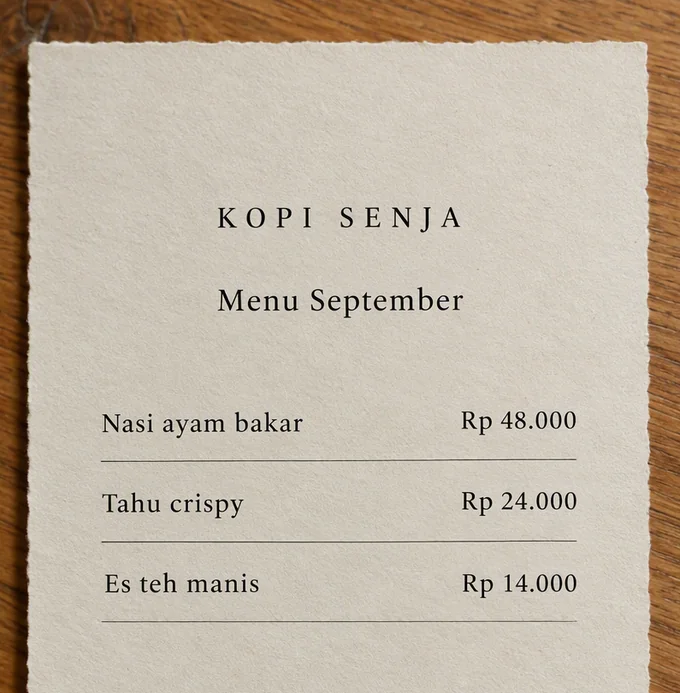
Scan at the table, add to the bill, then pay.
Customers just scan at the table to see the menu, place an order and add items to an open bill. When they are done, they can carry on to payment in chat.

| Item | Qty | Subtotal |
|---|---|---|
| Nasi ayam bakar | 2 | Rp 96.000 |
| Es teh manis | 2 | Rp 28.000 |
| Tahu crispy | 1 | Rp 24.000 |
Customers can ask for menus, brochures or catalogues in chat.
Customers can ask for menus, brochures or catalogues right in chat. Neo sends the files you have provided, with content that stays true to your business.

Sessions left, points or rewards? Just ask Neo.
Customers can check their points, rewards and remaining sessions through Neo. Team members with the right access can adjust member points from chat too.

When a customer comes back, the conversation carries on.
When a customer messages again, Neo understands the needs, orders or issues already discussed. The conversation carries on with the right context still in place.
As customers talk, the important details are captured neatly too.
Customers can share details as they talk, or when the question makes sense. Near checkout, Neo fills in the required details while still respecting what a customer declines to share.
Service history and warranty details stay easy to ask about.
Customers can check service history, warranty cover and the next maintenance date through Neo. After the transaction, the conversation stays connected to the same data.

Prefer talking? Send Neo a voice note.
Customers can simply explain what they need in a voice note. Neo understands the message and helps set up the next step in chat.

Today's sales, what is still unpaid, tomorrow's schedule. Just ask.
Ask Neo for a summary of sales, orders, bookings or invoices over WhatsApp. Choose the period you want to check, within your team's access.

| Status | Orders | Value |
|---|---|---|
| Done | 10 | Rp 2.000.000 |
| Needs preparing | 2 | Rp 400.000 |
Price changed? New photo? Tell Neo.
Ask Neo to change a price, swap a photo or duplicate a product over WhatsApp. It shows you the change it proposes, and waits for your confirmation before saving it.

From taking a booking to filling the slot that opened up.
Ask Neo to make a booking, mark someone as attended, or move a name off the waitlist. The schedule and the capacity still follow your rules.
| Attendees | Status |
|---|---|
| Dita Prameswari | Attended |
| Rani Putri | Registered |
| Maya Sari | Registered |
Parcel ready? Ask Neo to call the courier.
Ask Neo to arrange delivery for an order that is ready, and to check its status. You see the options and what each costs before the courier is booked.
Courier options and coverage follow what each service offers.
Stock running low or new items in? Just tell Neo.
Check what is running low, log what arrived, and record an adjustment over WhatsApp. Neo writes the movement down so the team can act on it.
| Ingredient | Remaining | Minimum |
|---|---|---|
| Wheat flour | 26 kg | 10 kg |
| Butter | 4 kg | 6 kg |
| Instant yeast | 1 kg | 2 kg |
Order processed or cancelled? Just let Neo know.
Ask Neo to update an order status or record a cancellation over WhatsApp. Your team can review the details first, then confirm the change based on access rights.
| Orders | Customers | Status |
|---|---|---|
| #NB-1041 | Rani Putri | Ready to ship |
| #NB-1042 | Dita Prameswari | Being prepared |
| #NB-1039 | Maya Sari | Cancelled |
Opening hours changed? Update services in chat.
Ask Neo to set opening hours for specific dates, delivery options and facility availability over WhatsApp. Your team can simply review the changes and save them as needed.
Quickly check a member and what they are entitled to.
When a customer arrives, your team can simply say the name or phone number to check remaining sessions, points, tier and stamp progress through Neo. If names are similar, Neo shows the options first.
Your team joins a conversation without asking it all again.
Hand a conversation to the right person and carry on from the shared inbox. When someone takes over, the chat history tells them what the customer needs.
Teach Neo how your business looks after customers.
Give Neo your product information, your policies and the way your business talks. Set what it may do on its own and when it should bring a person in.
Bring products, stock, orders and scheduling together, shaped to your business.
Bring your catalogue, stock and orders together for everyday retail.
Run orders and table bills for as long as the guests are seated.
Orders
Dine-in tables, their QR codes and the order open on each.
| Table | Open order | Status |
|---|---|---|
| 04 | Nasi ayam × 2#FB-318 · 19.04 | Preparing |
| 07 | Es kopi × 2#FB-317 · 18.52 | Served |
| 09 | Nasi ayam × 1#FB-319 · 19.09 | New |
Match bookings to the staff and the spaces you actually have free.
Dita · with Maya
Ruang 02 · 60 menitSet class capacity, session passes and who is taking part.
Sessions, capacity and attendance for the selected day.
| Session | Booked | Status |
|---|---|---|
| Pilates pagiNadia · Studio 1 | 8 / 10 | Open |
| Pilates siangRani · Studio 1 | 6 / 10 | Open |
| Pilates soreNadia · Studio 2 | 10 / 10 | Full · 1 waitlisted |
Manage room and court reservations against what is actually free.
Schedule
Availability by court and hour, with holds and confirmed bookings.
| Court | 16.00 | 17.00 | 18.00 |
|---|---|---|---|
| Court 01 | Booked | Booked | Free |
| Court 02 | Free | Held | Free |
| Court 03 | Booked | Free | Free |
Connect demo scheduling, customer records and business billing.
Bring services, staff and open hours together. From the first question to a booking on the calendar.
Explore bookings
The same product information for your team and for Neo.
Staff and spaces are matched to the booking.
Invoices and transaction status stay in sync.
Help customers find the option that fits.
Show products and services with photos, prices, variants and add-ons. Customers have an easier time choosing, and your team and Neo serve from the same information.
Catalog
Products, services and add-ons, priced per outlet.
| Item | Status |
|---|---|
| Hydrating SerumSkincare · 2 variants | Active |
| Daily SunscreenSkincare | Active |
| Barrier MoisturizerSkincare | Hidden |
Know what you can sell before a customer asks.
Check what is available, record what arrives, or move stock to the outlet that needs it. When a count changes, the stock history lets your team trace what happened.
Stock on hand per outlet, with receipts and transfers.
| Item | Kelapa Gading | Status |
|---|---|---|
| Hydrating SerumSRM-030 | 24 | In stock |
| Daily SunscreenSUN-050 | 18 | In stock |
| Barrier MoisturizerMST-050 | 12 | Low |
Give people a reason to buy, on terms you set yourself.
Set the discount, the dates it runs and the conditions for using it. Customers get the offer when they meet the terms.
Catalog
Codes, what they apply to and how many times each has been used.
| Code | Used | Status |
|---|---|---|
| GLOW1010% off · min. Rp 150.000 | 41 / 200 | Active |
| WELCOMERp 25.000 off · first order | 18 / ∞ | Active |
| RAYA2415% off | 312 / 312 | Expired |
Every order says what is in it and what happens next.
Keep the order details, customer notes and work status in one place, right through to pickup or dispatch.
Multi-channel order ledger across Dine-In, Takeaway, Delivery and Pre-order.
| Order | Customer | Status |
|---|---|---|
| #NB-1042 | Dita PrameswariWhatsApp · Kelapa Gading | Paid |
| #NB-1041 | Rani PutriWeb · Kelapa Gading | Preparing |
| #NB-1040 | Ayu SafitriWhatsApp · Senopati | Shipped |
| #NB-1039 | Maya LarasatiPOS · Senopati | Cancelled |
Guests order more? It goes on the same table's bill.
Tie an order to a table and add to it on the same bill. Your team can keep up with what guests need throughout their visit.
Orders
Dine-in tables, their QR codes and the order open on each.
| Table | Open order | Status |
|---|---|---|
| 04 | Nasi ayam × 2#FB-318 · 19.04 | Preparing |
| 07 | Es kopi × 2#FB-317 · 18.52 | Served |
| 09 | Nasi ayam × 1#FB-319 · 19.09 | New |
A tidy schedule, and a team ready for the customers coming in.
Take bookings against your staff's hours and the rooms or spaces you have. Reschedules, reminders and your cancellation terms live in the same flow.

| Time | Services | Customers | Status |
|---|---|---|---|
| 13.00 | Hair spa | Rani | Confirmed |
| 14.00 | Haircut | Dita | Confirmed |
| 15.00 | — | — | Available |
Fill your classes, track who is in them, run every session.
Build the class timetable, manage who is in each one, and watch capacity session by session. Passes and a waitlist help your team fill the room.
Sessions, capacity and attendance for the selected day.
| Session | Booked | Status |
|---|---|---|
| Pilates pagiNadia · Studio 1 | 8 / 10 | Open |
| Pilates siangRani · Studio 1 | 6 / 10 | Open |
| Pilates soreNadia · Studio 2 | 10 / 10 | Full · 1 waitlisted |
See the open slots and help the customer pick a time.
Manage rooms and courts along with their capacity. Your team can see what is booked and what is still free.
Schedule
Availability by court and hour, with holds and confirmed bookings.
| Court | 16.00 | 17.00 | 18.00 |
|---|---|---|---|
| Court 01 | Booked | Booked | Free |
| Court 02 | Free | Held | Free |
| Court 03 | Booked | Free | Free |
The customer stays put. Your team goes to them.
Define the areas you travel to and what the trip costs for a visit to a customer. Cap how much work you take per day so the schedule matches what your team can do.
Send the invoice, then track the payment.
Raise an invoice and send the customer a payment link. Track what has been paid and what is still outstanding on the same record.
Issue a payable, numbered invoice to your customer and get paid on the same rails Neo uses.
| Number | Total | Status |
|---|---|---|
| #INV-0231 | Rp 2.400.000 | Paid |
| #INV-0230 | Rp 6.750.000Rp 3.375.000 outstanding | Partly paid |
| #INV-0229 | Rp 890.000 | Overdue |
| #INV-0228 | Rp 1.150.000 | Draft |
Start with a deposit, then pay as agreed.
Offer a deposit and a balance, or split the payment into stages. For work done in phases, the billing can follow the progress.
Optional. Progress billing needs a service workflow.
DP · Rp 900.000
Paid
Tahap pekerjaan · Rp 1.200.000
Next invoice
Pelunasan · Rp 900.000
After the work is done
A cancellation? Settle it with the reason on record.
Handle cancellations and refunds under your own policy. The transaction record keeps the amount, the status and the reason together.
Choose how you ship, set what it costs, and follow the parcel. Shaped around how your business actually delivers.

Book a courier or deliver it yourself, whichever suits the order.
Choose which courier services you offer, or deliver with your own fleet. Set the areas you cover, your own rates and your packaging so the delivery options match how you actually ship.
Courier options and coverage follow what each service offers.

Make shipping an offer worth taking, while keeping costs under control.
Set a flat rate, add a markup, or cover part of the shipping up to a cap you choose. Offer free shipping once an order passes the amount you set.
Settings
What the courier charges, what you absorb and what the customer pays.
Customers know where the parcel is. Your team knows what to chase.
Share a tracking page so customers can follow the parcel themselves. Your team can check the waybill, the status history and whatever courier details the shipping service provides.
Order #KR-204 · 2 ceramic mugs
09.10 · Order being prepared
10.25 · Paket diterima kurir
13.40 · On the way to your address
Get to know your customers. Send offers that fit them, then build the relationship with membership and rewards.
Purchase history, membership and rewards, so you can welcome them back properly.

Match the message to what the customer cares about.
Points and rewards give people a reason to return.
Remember your customers, down to what they like.
When a customer comes back, you do not have to start from scratch. Their chat history, their purchases and the details that matter sit in one profile, and Neo adds what it picks up from the conversation.
Every customer, with their tier, points and lifetime value.
| Member | Tier |
|---|---|
| Dita Prameswari+62 812 •••• 4417 · WhatsApp | Glow |
| Rani Putri+62 813 •••• 9082 · WhatsApp | Glow |
| Maya Sari+62 811 •••• 3350 · Imported | None |
An offer that fits feels personal.
Send a campaign to the right group of customers, with a message that fits their profile. Use a name, a membership tier, or whatever customer detail you already hold to make the offer feel more personal.
Campaigns
200 recipients · WhatsApp · not yet sent
| Recipient | Message preview |
|---|---|
| Dita Prameswari | Hi Dita, your favourite serum is back in stock.Code GLOW10 · valid 7 days |
| Rani Putri | Hi Rani — running low on sunscreen?Code GLOW10 · valid 7 days |
| Maya Sari | Hi Maya, there is an offer on body care.Code GLOW10 · valid 7 days |
A customer replies to a campaign? Neo carries the conversation on.
When a customer replies to a campaign, Neo explains the offer and carries on with the order or booking. Your team can follow the thread with the campaign context attached.

Know which campaign actually brought in orders.
Track the replies and the orders connected to a campaign. Set the result against what sending it cost, and decide what the next offer should be.
Campaigns
Isi ulang skincare · sent 18 Sep · 7-day attribution window
200 sent
Make the next visit something to look forward to.
Give customers something to come back for. Build a points programme, membership tiers or a stamp card, then set the benefits and rewards that suit your business.

The sale is done; looking after the customer is not.
Keep service records, documents and warranty details in one place. Reminders let a customer know when it is time to come back.
See how your business is doing and what needs attention.

Sales were up yesterday, driven by afternoon orders.
Each morning, Neo Digest sums up how your business is doing and what you need to check first.

24 VIP members have not bought anything in 30 days.
Send campaignOn Thursday morning, Neo Insights spots that 24 VIP members have not shopped for a while and suggests a relevant offer. Send the campaign that day to bring them back for the weekend.

Neo Impact tracks customer questions answered, bookings and orders handled, team hours freed up, and the checkout value generated.
Track sales, bookings and invoices. Drill into the details by period or outlet.
Watch how your business is doing, set your team's access, and manage your use of Neobiz from one place.

From what you sold to what is still unpaid.
People get the access their job needs.
Track transactions, fees and payouts.
Every outlet works its own way. You still see the whole business.
Set opening hours, services and staff access for each outlet. Run branches that work differently without losing sight of the whole business.
Settings
Outlets, their opening hours and which fulfilment modes each offers.
| Outlet | Address & hours |
|---|---|
| Kelapa Gading | Jl. Boulevard Raya · 09.00–21.00 |
| Kemang | Jl. Kemang Selatan · 10.00–20.00 |
Give your team room to work, with clear limits on what they can access.
Set roles and access to match what each person is responsible for. The activity history shows who changed what.
Settings
Who can sign in, what they can do and which outlets they can see.
| Member | Role |
|---|---|
| Maya Larasatimaya@lumabeauty.id | Owner |
| Rani Putrirani@lumabeauty.id | Manager |
| Dita Handayanidita@lumabeauty.id | Staff |
Dita Handayani
The things that matter reach whoever can act on them.
Set up alerts for the things your team needs to know about. Choose who gets what, so news reaches whoever is going to act on it.
Order #NB-1042 has been paid
Orders team · just now
Hydrating Serum needs restocking
Inventory team · 10 minutes ago
Service schedule updated
Staf layanan · 25 menit lalu
Know when the money lands and whether it has been paid out.
Track payouts and the fees attached to each transaction. When something is held up, your team can see the note that explains it.
Reports
Transactions grouped into settlement batches, with fees and net.
| Transaction | Amount |
|---|---|
| #TRX-104222 Sep · #NB-1042 | Rp 189.000 |
| #TRX-104122 Sep · #NB-1041 | Rp 318.000 |
| #TRX-104021 Sep · #NB-1040 | Rp 139.000 |
Your plan, your invoices and your usage, easy to follow.
See your plan, your subscription invoices and how much credit you have used, so you can match Neobiz to what your business actually needs.
Settings
Your plan, what is included and what this period has used.
Bring the data you already have and connect Neobiz to the WhatsApp, payment and shipping services your business uses.
Keep serving customers through WhatsApp on your phone.
Bring over the history and contacts you have.
Import your catalogue and your customers, then review what came in.
Same number as before. You, your team and Neo can all work on it together.
Connect your business WhatsApp number to Neobiz. The owner still uses WhatsApp Business on their phone, while Neo and your team serve customers from the same number. Link it through Coexistence, your business's own Meta account or Twilio, whichever suits how your team works.
The connection follows WhatsApp Business terms and Meta's onboarding process.

Carry on serving from the conversation you already have.
Bring across the chat history and contacts you already have when you connect WhatsApp Business. Imported contacts become customer profiles, so your team does not have to rebuild the customer list by hand.
Needs an eligible connection and permission to share history during onboarding. What comes across depends on what history is available.
Settings
The WhatsApp number your customers already know, and what came across with it.
Completed 19 Sep, 11.04
Bring the data you already keep. No need to type it again.
Import products, variants, add-ons, services, members and passes from a spreadsheet. Photos are matched by filename, and you review everything before it is saved.
Catalog
Products, services and add-ons, priced per outlet.
| Item | Status |
|---|---|
| Hydrating SerumSkincare · 2 variants | Active |
| Daily SunscreenSkincare | Active |
| Barrier MoisturizerSkincare | Hidden |
Nothing is saved until you have looked at what came in.
Use iSeller or Runchise for your catalogue and orders.
Connect the iSeller or Runchise setup you already use. Products and stock come into the Neobiz catalogue, while orders from Neo chat and online checkout are sent to the POS for each outlet.
Settings
The POS your outlets already run, and what flows each way.
One connection per business
Set send hours, cap messages and respect opt-outs.
Set quiet hours, send limits per member and opt-outs, so messages stay under control. Emails go through Resend, while SMS uses Twilio to match your business settings.
Settings
Control campaign quiet hours, per-member caps, and attribution settings.
Connect once, then choose the right courier for each order.
Connect your shipping integration to open up lots of courier options in one flow. Service levels are already mapped, labels can be printed in one go, and shipping status goes back to the order.

When the standard features are not enough, our team builds with your company so Neo fits the data, rules and service flows you already use.
Connect Neo to your systems through REST API, webhooks and connectors. Our team builds it so the flows, data and business rules match your company's processes.
Credentials are stored in encrypted form, and each company's data stays separate.
A 99.9% SLA commitment is written into the contract, so service expectations are clear from the start.
Your business and customer data is stored in data centres in Indonesia, with capacity that can grow as demand rises.
Every important action is logged and can be read through the API, so your team can trace changes more easily.
Access is set by role and by outlet, with a DPA agreed from the start for clear data processing terms.
Talk through your business processes with our team, and we will build Neo around the flows and data you use.
Talk to our teamTell us how your business runs today, and we will show you the parts that help soonest.